INSTALL INSTRUCTIONS (READ BEFORE INSTALLING!!)
IMPORTANT INSTALL NOTICE #1
It is HIGHLY RECOMMENDED that you use the default install folder when installing Deloria Online from the installer. Do NOT use folders that require additional permissions.
Default on most newer versions of Windows: C:\Users\~currentuser\AppData\Roaming\Deloria Online
* \AppData\ is a hidden folder so you may have to enable ‘Show Hidden Items‘ from the View Menu.
IMPORTANT INSTALL NOTICE #2
Deloria Online is is written in legacy Microsoft coding language Visual Basic 6. Newer versions of Windows and Microsoft Defender just flat out do not like VB6 anymore (even though they are both Microsoft products) and problems can be encountered when installing, running and updating the game.
It is HIGHLY RECOMMENDED that you add your Deloria Online game folder to the ‘Microsoft Defender Antivirus exclusion list‘ right after installing from the Visual Studio Installer, and before running the game itself for first time. This will prevent the system from quarantining files in this folder. If you do not, chances are files will get quarantined as installed/updated and then you will need to manually restore them each time, as well as it may mess up the game update process.
ADD DELORIA ONLINE TO MICROSOFT DEFENDER ANTIVIRUS EXCLUSION LIST
1. Open ‘Virus & threat protection‘ from Windows Security.
2. Under ‘Virus & threat protection settings‘, click Manage settings.
3. Scroll down to ‘Exclusions‘ and click Add or remove exclusions and add your newly installed Deloria Online folder.

INSTALL DIRECTIONS
1. Download the Deloria Online Visual Studio installer file and run to install.
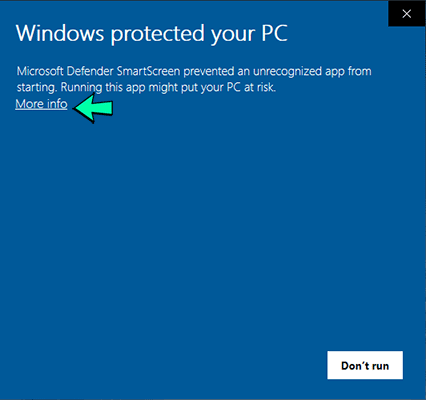
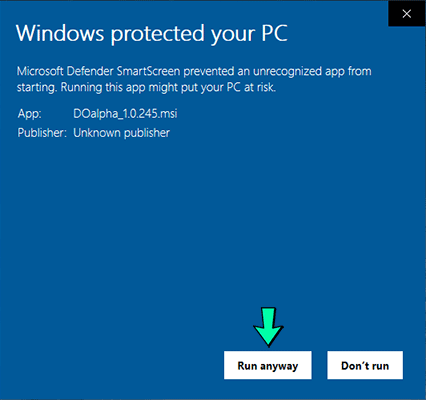
2. Click ‘More Info‘ then ‘Run anyway‘ after running the installer (if asked).
3. Add your newly installed Deloria Online game folder to the ‘Microsoft Defender Antivirus exclusion list‘ right after installing from the Visual Studio Installer, and before running the game.
4. Launch the game to update to newest version and enjoy!
Deloria Online Open Beta 1.0.575 Installer
Download DObeta_1.0.575_base_install.msi